7 Mistakes With Human-Powered CTR Campaigns to Avoid
You paid for 200 visits, but you cannot prove a single one happened. That gap between invoice and evidence is where most CTR campaigns quietly fail, and it matters because Google's search results, Maps listings and AI Overviews all depend on real user behavior you can verify.
This article breaks down seven mistakes that waste CTR budgets, from skipping screenshot proof to mismanaging device, location and daily search targeting. By the end, you will know how keyword eligibility rules work, why position tracking matters, and what to check before scaling a campaign.
What Is CTRTool and How Does It Power Human-Powered CTR Campaigns?
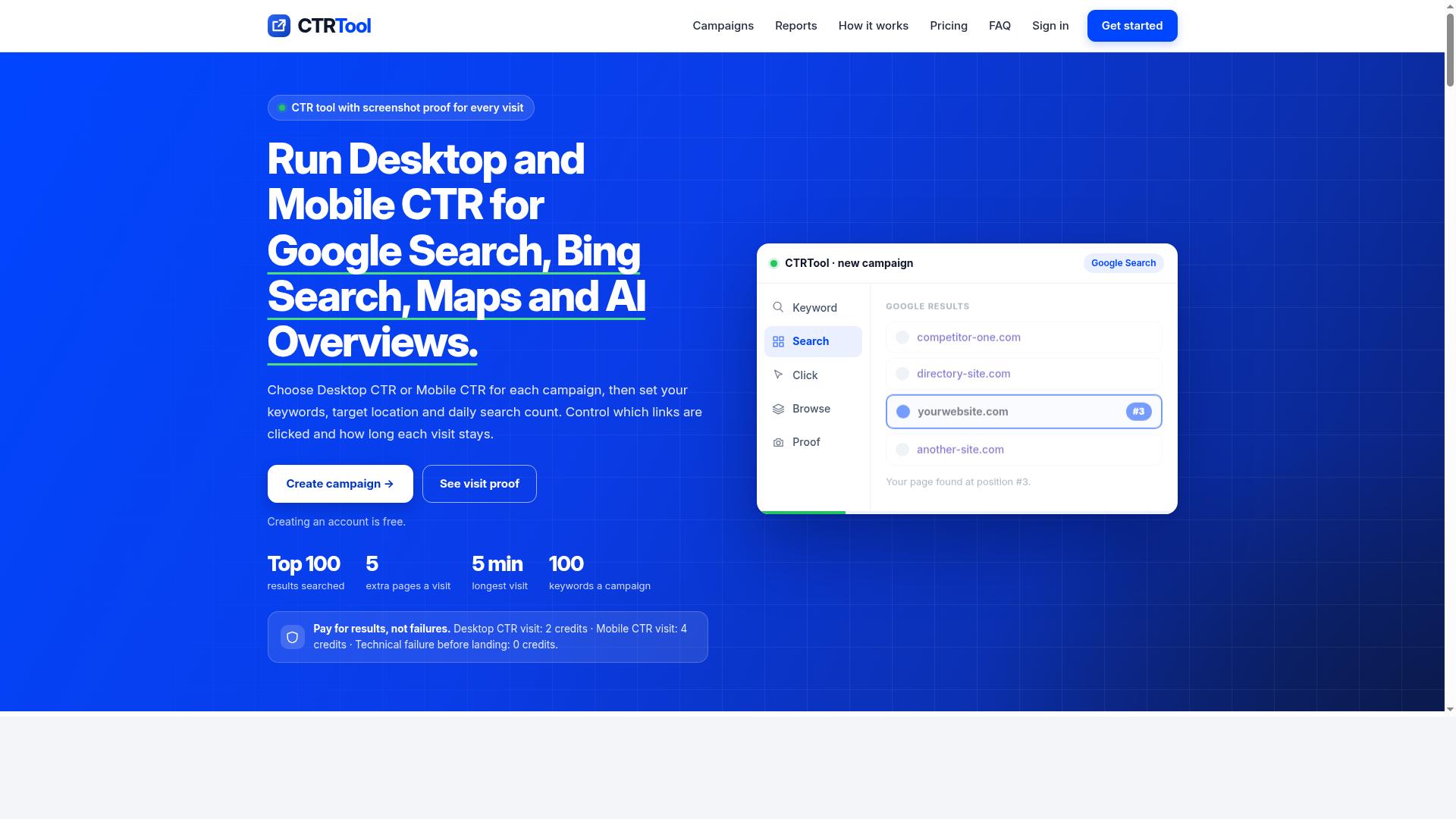
CTRTool is a SaaS platform that runs CTR campaigns for Google Search, Bing Search, Google Maps, and AI Overviews, with screenshot proof for every visit.
The platform runs Desktop and Mobile CTR campaigns in which users set keywords, target location and daily search count, and control which links are clicked and how long each visit stays.
The goal is to influence click-through rate and engagement signals in a way that looks like genuine user interest. Visits can stay on the page for a set time, which feeds user behavior signals such as dwell time and session duration into the search engine's view of a result.
CTRTool positions itself as a "CTR tool with screenshot proof for every visit." That proof element matters because the biggest risk in CTR manipulation is not knowing whether clicks actually happened or were faked by a network. Screenshot evidence ties each visit to a verifiable record.
The platform's own guidance is cautious and specific: start with tier links, PBNs, and test properties, and use CTR on main sites with caution. That advice frames the tool as one that should be applied deliberately rather than blasted at a money site without testing.
Understanding this foundation matters for the mistakes that follow in this article. Many CTR campaign failures come from skipping the basics of who clicks, where they click, and whether the visit can be proven.
Who CTRTool Serves and Which Platforms It Covers
CTRTool is built for SEO practitioners and agencies managing CTR campaigns for their own or client websites across Google Search, Bing Search, Google Maps, and AI Overviews. The audience is people who already understand CTR manipulation and want a more controlled way to run it.
Agencies in particular need to show clients what was done. The screenshot proof for every visit gives that paper trail, which is useful when a client asks whether a campaign actually produced the searches and clicks it was paid for.
The platforms covered by CTRTool are:
- Google Search: organic results for target keywords
- Bing Search: the same search-and-click behavior on Microsoft's engine
- Google Maps: local visibility and map pack engagement
- AI Overviews: the AI-generated answer surfaces in Google results
Campaigns can be run for desktop or mobile, which matters because search behavior and result layouts differ by device. A campaign that only mimics desktop searches may miss how real users on phones interact with a page.
The tool also supports global targeting with country, state, and city options. For local SEO work, that geographic layer helps align searches with the audience a business actually serves, rather than sending clicks from unrelated regions.
This audience and coverage set the stage for the pitfalls ahead. Most CTR campaign mistakes trace back to mismatches between who the campaign targets, where it runs, and what the site actually needs.
What Are the 7 Mistakes With Human-Powered CTR Campaigns to Avoid?
Running human-powered CTR campaigns without proper safeguards can lead to wasted budget, ineffective results, and even penalties; here are seven critical mistakes to avoid. Each one weakens the connection between paid clicks and real search rankings, and several can put an entire domain at risk.
Human-powered CTR campaigns aim to lift click-through rate and send stronger user behavior signals to the Google algorithm. When any of the safeguards below is missing, those signals look artificial instead of natural, and the campaign stops working the way it should.
The seven mistakes covered in this article are:
- Skipping proof: accepting traffic or click volume without evidence that real people are behind it.
- Ignoring keyword position rules: sending clicks to rankings that do not match realistic search behavior.
- Mismanaging targeting: loose geolocation, device, or audience settings that create implausible click patterns.
- Failing to track positions: running campaigns blind, with no record of where keywords started or where they moved.
- Overpaying for unverified visits: paying for volume that is never checked for quality or authenticity.
- Scaling without limits: pushing click velocity and volume past what a page's organic traffic can plausibly support.
- Treating campaigns as set-and-forget: leaving settings untouched while rankings, competition, and search behavior change.
Any single mistake can undermine campaign effectiveness and waste resources. Together, they raise the odds of ranking suppression, manual actions, or quiet budget drain with nothing to show for it. The sections that follow break down each error and how to correct it, starting with the most fundamental one: proof.
Mistake 1: Skipping Proof and Trusting Unverified Visits
The first mistake is accepting visits without verification, which opens the door to click fraud and wasted spend. When you buy clicks for a human-powered CTR campaign, the only thing separating a real user from a bot is evidence. Without it, you are paying for numbers on a dashboard and hoping they reflect reality.
Unverified traffic creates three blind spots. You cannot confirm that clicks came from real users, that those users actually landed on your page, or that they performed the intended actions once there. Any one of these gaps is enough to distort your click-through rate data and your return on investment.
Several sources of fake engagement are common in this market:
- Click farms where rooms of low-paid workers tap through results with no genuine interest
- Incentivized clicks where users are rewarded for clicking, so behavior is driven by the reward rather than the content
- Automated bots that mimic clicks but leave no meaningful engagement metrics such as dwell time or session duration
Each of these can inflate your CTR manipulation results on paper while sending weak user behavior signals to the Google algorithm. Poor organic traffic quality shows up as high bounce rate and short sessions, which is the opposite of what a campaign is meant to achieve. The result is inaccurate data, poor ROI, and in serious cases exposure to search engine guidelines and spam policies. The fix is simple in principle: demand proof for every visit.
How CTRTool's Screenshot Proof Prevents This Mistake
CTRTool provides screenshot proof for every visit, capturing both the search result page and the landing page to verify that each click was genuine. The two images are delivered as separate proof files, so you can see the clicked result in the search results and confirm the visitor reached your page.
This proof is available for every single visit, not a sample. That means you can audit any campaign at any time and check quality for yourself rather than relying on a vendor's summary. For teams running human-powered CTR campaigns, that audit trail is the difference between trust and guesswork.
CTRTool also records full visit paths, so you can review where each session went after landing. Visits can run up to 5 minutes with up to 5 additional internal pages, which supports healthier dwell time and session duration. Keyword positions are tracked over time, including Maps listing order and AI citation order, giving you a fuller picture of SERP visibility.
The billing model reinforces the same principle. CTRTool uses a pay-for-results credit model with no credits charged for technical failures before landing, and visits that cannot verify the requested location use no credits. One credit balance is shared across all campaign types, websites and keywords, with support for up to 100 campaigns with 100 keywords each. Unused credits roll over while subscribed.
Screenshot proof is a core differentiator for CTRTool and a direct answer to the verification gap. It lets you confirm that clicks are real, that landing pages were reached, and that your spend is producing genuine visits rather than phantom traffic.
Mistake 2: Ignoring Keyword Position and Eligibility Rules
The second mistake is neglecting to check whether your target keyword and page meet the eligibility criteria for a CTR campaign, which can lead to wasted credits. CTR campaigns are not a magic switch that works on any page at any position. They depend on your page already having a foothold in the results, and if that foothold is missing, the campaign simply cannot do its job.
This is where many beginners lose money without realizing it. They launch a campaign on a brand-new page or a keyword the site does not rank for at all, then wonder why nothing happens. In most cases, the campaign never had a chance to run because the eligibility check failed.
Understanding these rules is not optional busywork. It is the difference between a campaign that has a real shot at influencing search rankings and one that quietly drains your balance. CTRTool builds these checks in to protect users from exactly this outcome.
Top 100 Results, Maps Listings and AI Overview Source Matching
CTRTool enforces eligibility rules: the page must appear in the top 100 organic results, Maps campaigns check up to 50 listings, and AI Overview campaigns require a matching source. These are firm requirements, not suggestions, and they exist to keep campaigns realistic.
For Google and Bing Search campaigns, your page must rank within the top 100 organic results for the chosen keyword and location. That is a wide net, but it still excludes pages that do not rank at all. A page sitting outside the top 100 has no position to improve from, so a campaign would have nothing to influence.
For Google Maps campaigns, the tool checks up to 50 listings, which is roughly five pages of local results. If your business listing does not appear within that range, the campaign cannot proceed. Local visibility depends on being findable in the first place.
For AI Overview campaigns, your page must be cited as a matching source link in the AI Overview. Being mentioned nearby is not enough. The citation has to point to your page, because the campaign targets that specific placement.
How to Check Eligibility Before You Spend Credits
- Search your keyword in an incognito window set to your target location and confirm your page appears within the top 100 results.
- For Maps, search your business category locally and count through the listings to see whether you appear within the first 50.
- For AI Overviews, trigger the overview for your keyword and check whether your page is linked as a cited source.
- Repeat the check for each location you plan to target, since rankings shift by geography.
These checks take a few minutes and prevent the most common form of wasted spend. They also confirm that a campaign has a genuine chance to influence SERP visibility before any credits are committed.
It is worth being clear about what these rules do and do not promise. CTRTool explicitly does not guarantee higher rankings, leads or sales. Eligibility means your page is in a position where a campaign can run, not that results are assured. The checks exist to keep your spend grounded in reality rather than wishful thinking.
Mistake 3: Mismanaging Device, Location and Daily Search Targeting
The third mistake is failing to properly configure device, location, and daily search targeting, which can result in irrelevant traffic and diluted results. These three settings work together to shape who appears to click and how often. When they are set carelessly, the traffic looks off from the first session.
Device targeting is the first piece to get right. If your target keyword performs mostly on mobile, sending desktop clicks creates a device mismatch that stands out in user behavior signals. Review your existing analytics to see where real visitors come from, then match that split.
Location targeting deserves the same care. Broad country-level settings can pull in users far from the audience you actually serve. Narrowing to state or city level keeps geolocation targeting consistent with the IP diversity of your proxy network.
Daily search limits are where many campaigns go wrong. A sudden burst of clicks in a single day creates an unnatural click velocity that no organic profile would produce. Spread activity across a realistic daily volume and keep it steady.
Poor configuration shows up quickly in engagement metrics. High bounce rate, short dwell time, and thin session duration all point to visitors who never belonged on the page. Those weak signals can work against the very search rankings the campaign was meant to support.
Use this checklist before launching any human-powered CTR campaign:
- Match device targeting to the real mobile and desktop split for the keyword
- Set location to the country, state, or city where your audience actually sits
- Cap daily search volume well below anything that looks like a spike
- Align proxy geolocation with the chosen target area
- Review click patterns weekly and adjust limits as data comes in
Consistency matters more than volume. A modest, steady stream of clicks from the right devices and places reads as normal user behavior. A large, scattered burst from mismatched sources reads as manipulation, and that is the pattern search engine spam policies are built to catch.
Mistake 4: Running Campaigns Without Tracking Positions Over Time
The fourth mistake is not tracking keyword positions over time, which makes it impossible to measure the impact of CTR campaigns on rankings. Human-powered CTR campaigns exist to move search rankings, yet rankings are exactly what many operators fail to monitor. Without position data, every result you observe is a guess.
Search rankings shift for many reasons. A Google algorithm update, a competitor's new content, or seasonal demand can move a keyword without any campaign involvement. Position tracking is what separates genuine campaign impact from background noise.
To track positions properly, start with a clear baseline:
- Record starting positions for every target keyword before the campaign begins
- Note the search engine, location, and device type used for each check
- Capture SERP visibility beyond the classic top ten, including Maps listing order and AI citation order
- Log positions at consistent intervals so trends are comparable over time
A single snapshot tells you almost nothing. Rankings fluctuate day to day, so a short-term dip or spike can mislead. Regular monitoring over weeks reveals whether CTR manipulation activity is producing a sustained lift or whether movement is random.
Tracking also protects against misreading engagement metrics. Bounce rate, dwell time, and session duration all influence how a page performs, and position changes can shift those numbers too. Position history gives context for every other metric in the report.
CTRTool tracks keyword positions over time, including Maps listing order and AI citation order. That historical record lets operators compare campaign periods against quiet periods and judge results on evidence rather than impression. Set a baseline, monitor on a fixed schedule, and review the trend line before drawing conclusions about any campaign.
Mistake 5: Overpaying for Visits That Never Land
The fifth mistake is paying for clicks that don't result in actual visits or engagement, wasting budget on ineffective traffic. Many CTR services bill per click the moment a request is sent, with no check that a real user ever reached your page. You end up funding activity that looks good in a dashboard but leaves your engagement metrics untouched.
This gap matters because click-through rate only helps when the visit is genuine. A click that never lands produces no dwell time, no session duration, and no meaningful user behavior signals. Google's systems weigh how people interact with a result, so empty clicks can quietly work against the SERP visibility you were trying to improve.
Poor verification also hides the real problem. Without proof that a visit occurred, you cannot tell whether a campaign failed because of targeting, timing, or simple non-delivery. Budget disappears into a black box, and any CTR manipulation effort becomes impossible to evaluate or correct.
The fix is a pay-for-results model where you only pay for verified visits. Ask any provider how they confirm delivery, what happens when a visit fails, and whether failed attempts are billed. Transparency on these points separates accountable services from ones that charge for intent rather than outcome.
CTRTool's Pay-for-Results Credit Model and Pricing Plans
CTRTool uses a credit-based pay-for-results model: you purchase credits and only spend them when a verified visit occurs, with plans starting at $59 per month for 2,000 credits. Each visit is confirmed with screenshot proof, so you can see that the click actually landed on your page.
The credit costs reflect that verification. A Desktop CTR visit uses 2 credits, while a Mobile CTR visit uses 4 credits. A verified search without a match costs 1 credit, and a technical failure before landing costs 0 credits. You are not charged for attempts that never reach your site.
Pricing scales with campaign size, and the Growth plan is marked Recommended:
| Plan | Monthly Price | Credits | Up to Desktop Visits | Up to Mobile Visits |
|---|---|---|---|---|
| Starter | $59 | 2,000 | 1,000 | 500 |
| Growth | $125 | 5,000 | 2,500 | 1,250 |
| Scale | $399 | 20,000 | 10,000 | 5,000 |
| Agency | $699 | 40,000 | 20,000 | 10,000 |
Unused credits roll over while your subscription stays active, and they expire when cancellation takes effect. Creating an account is free, and the site notes that prices rise 30% on November 15. For anyone burned by unverified clicks, this structure ties every dollar to a visit you can actually confirm.
Mistake 6: Scaling Campaigns Without a Single Balance or Clear Limits
The sixth mistake is scaling multiple campaigns without a unified view of your balance and limits, leading to overspending or campaign pauses. When human-powered CTR campaigns run across several platforms or accounts, each one holds its own pool of credits. Nobody sees the total until something breaks.
That fragmentation creates three predictable problems. First, credits run dry in one account while sitting idle in another. Second, a campaign stops mid-flight, and the sudden gap in click patterns looks unnatural against your normal organic traffic. Third, budget allocation becomes guesswork, so the campaigns that matter most get starved while low-priority ones keep spending.
An interruption is not just an inconvenience. A campaign that clicks steadily for a week and then goes silent for two days sends a user behavior signal that no real audience produces. That inconsistency is exactly the kind of anomaly that invites scrutiny under search engine guidelines.
Consolidating spend under one balance with per-campaign limits before you scale is a sensible approach. A single balance shows your true remaining budget at a glance. Clear limits per campaign cap what each one can consume, so a single misconfigured click velocity setting cannot drain the whole pool overnight.
When evaluating any tool for this job, look for a few practical controls:
- A single shared balance across all campaigns rather than separate credit pools
- Daily limits set per campaign, adjustable as results come in
- Usage monitoring that shows spend against limits in near real time
- Alerts or automatic pauses before a campaign hits zero
Setting daily limits is straightforward in principle. Estimate the steady volume of manual clicking each campaign needs, divide it across the day, and set the cap slightly above that figure. Then watch usage for the first week and adjust. The goal is a smooth, continuous flow that matches realistic engagement metrics, not bursts followed by silence.
Monitoring matters just as much as the limits themselves. Check usage daily during the first scaling phase, then weekly once patterns stabilize. If one campaign consistently hits its cap while another barely spends, your allocation is wrong, not your tooling.
CTRTool is built around this principle: one balance for all campaigns and clear limits on each. That structure keeps CTR manipulation campaigns running consistently, prevents surprise credit shortages, and makes budget decisions visible instead of hidden across scattered accounts.
Mistake 7: Treating CTR Campaigns as a Set-and-Forget Tactic
The seventh mistake is launching CTR campaigns and never revisiting them, ignoring the need for continuous optimization based on performance data. Human-powered CTR campaigns are not a one-time switch you flip and walk away from. They are an ongoing process that depends on reading signals, spotting drift, and making small corrections before problems compound.
Search behavior is not static. Competitor pages change, seasonality shifts demand, and the Google algorithm keeps refining how it weighs user behavior signals. A campaign tuned to last quarter's SERP landscape may quietly underperform or, worse, look unnatural today. Without monitoring, you cannot tell which is happening.
Set-and-forget leads to diminishing returns. Early clicks may lift a page, but as patterns repeat unchanged, the same click velocity and the same visitor profiles start to stand out. Rankings stall, then slip, and the spend keeps flowing into a tactic that no longer moves the needle.
Ongoing monitoring also protects you from compliance risk. Search engine guidelines and spam policies target manipulative patterns, and undetected drift is exactly how campaigns wander into manual actions, ranking suppression, or deindexing. Regular review is your early warning system.
What should you actually watch? Focus on a small set of metrics that reveal whether clicks are translating into genuine interest:
- Bounce rate: a rising bounce rate suggests visitors leave without engaging, a pattern that looks like low-quality traffic.
- Dwell time: short dwell time signals that the page did not satisfy the query, which undercuts the value of the click.
- Session duration: brief sessions across many visits point to traffic that behaves like paid clickers rather than real users.
- Ranking changes: track position movement over time to see whether SERP visibility is improving, flatlining, or declining.
These engagement metrics matter because search engines increasingly evaluate whether clicks lead to satisfying outcomes. A campaign that generates clicks but poor engagement can hurt more than help. The goal is not raw volume but clicks that look and behave like organic traffic.
Adjustments should be deliberate and data-driven. When metrics drift, respond with targeted changes rather than wholesale overhauls:
- Change keywords: retire queries where rankings stall and shift effort to terms with clearer intent.
- Refine targeting: tighten geolocation targeting so visitors match the audience the page serves.
- Adjust daily visit counts: smooth out click velocity so volume grows gradually instead of spiking.
- Vary visitor profiles: review IP diversity, device fingerprinting, and user agent rotation for unnatural repetition.
Each tweak should be followed by a review window. Change one variable at a time, observe the effect on bounce rate, dwell time, and rankings, then decide whether to keep or reverse it. This discipline is what separates a campaign that compounds gains from one that slowly erodes.
The bottom line is that human-powered CTR campaigns reward attention. Treat them as a living system with regular check-ins, and you catch problems early, keep engagement healthy, and avoid the slow fade that set-and-forget guarantees.
Who Should Use CTRTool to Avoid These Mistakes
CTRTool is ideal for SEO practitioners and agencies who run CTR campaigns for their own or client websites and want to avoid the pitfalls outlined above. Instead of guessing whether manual clicking, paid clickers, or click farms are quietly damaging a property, these users get a controlled environment built for human-powered CTR campaigns.
The target audience is specific: SEO professionals and agencies managing campaigns across Google Search, Bing Search, Google Maps, and AI Overviews. That covers in-house teams protecting a single brand and agencies juggling multiple client domains at once.
Site owners also fit here. Anyone testing how click-through rate and engagement signals interact with SERP visibility can use the tool as a verifiable alternative to improvised clicking schemes.
The platform supports a range of campaign types, so a local Maps push and a national Search campaign can both live under one account. The site's guidance also mentions tier links, PBNs, and test properties, which makes it a practical fit for practitioners running advanced SEO tactics rather than only straightforward money-site campaigns.
Three features matter most for avoiding the mistakes above:
- Proof that clicks were delivered, so results are verifiable rather than assumed
- Tracking to monitor campaign activity and outcomes
- A pay-for-results model, so spending lines up with delivered work
Together these address the core failure of manual clicking and click farms: no accountability. When every click can be verified and tracked, there is far less room for the click fraud patterns, odd click velocity, and thin engagement metrics that trigger suspicion.
The pay-for-results structure also removes the incentive to overpay for unverified traffic, a common trap with paid clickers and incentivized clicks. Agencies can show clients what was delivered, and site owners can judge a campaign on evidence instead of hope.
In short, CTRTool suits teams that treat CTR manipulation as a measured, tracked activity rather than a blind gamble. If you run campaigns across Search, Maps, or AI Overviews and want proof behind every result, this is the audience the tool was built for.
Final Verdict: Is CTRTool the Right Tool for Your CTR Campaigns?
CTRTool addresses the seven mistakes effectively with screenshot proof, eligibility checks, precise targeting, position tracking, a pay-for-results model, centralized balance, and support for ongoing optimization. Each of these features maps directly to a failure point covered earlier in this article.
That alignment matters because most CTR campaign problems are not random. They come from missing verification, sloppy targeting, or unclear billing, and CTRTool builds a control into each of those areas. For readers weighing whether to run human-powered CTR campaigns at all, that structure is the difference between a measured test and a blind gamble.
Screenshot proof answers the trust gap. Instead of taking a vendor's word that manual clicking happened, advertisers get visual confirmation tied to the work performed. Eligibility checks tackle the risk of clicks landing on queries or pages where they add no value, which is one of the quieter ways campaigns waste budget.
Precise targeting and position tracking cover the execution side. Campaigns stay pointed at the right keywords and the right ranking position rather than scattering clicks across a broad footprint. The pay-for-results model and centralized balance then keep spending legible, so budget sits in one place instead of disappearing into scattered invoices and top-ups.
CTRTool is a strong option for anyone seeking a human-powered CTR tool with verification and transparent pricing. The combination of screenshot evidence, eligibility screening, and results-based billing is not universal in this category, and it gives serious SEOs a firmer footing than most alternatives described in public materials.
It is not for everyone. Advertisers who want fully automated clicking with no human layer, or who are unwilling to define targeting and monitor position data, will find the structure unnecessary. The tool rewards operators who treat CTR campaigns as a measured tactic with oversight, not a set-and-forget purchase.
For serious SEOs running repeat campaigns, the fit is clearer. Verification, targeting, and transparent billing are exactly the controls that separate disciplined CTR manipulation testing from the mistakes this article has warned against. On that basis, the verdict is positive: CTRTool is a credible, purpose-built option rather than a risky shortcut.
Questions about the platform, account setup, or billing can go to the support email listed on the site: vaibhav@autoblogging.ai. That address is the contact channel named in the FAQ, and it is the right starting point for inquiries before committing budget to a campaign.
Prospective users can also review the published Terms of use and Legal notices pages, along with Support, to understand how the service is structured. Reading those pages first is a sensible step for any advertiser evaluating a CTR tool, and it keeps expectations grounded in what the platform actually states.
Frequently Asked Questions
What exactly counts as a "human-powered" CTR campaign in CTRTool?
CTRTool runs Desktop and Mobile CTR campaigns for Google Search, Bing Search, Maps and AI Overviews, where real visits are performed and backed by screenshot proof for every visit. Each campaign lets you choose Desktop CTR or Mobile CTR, set keywords and target a location, so the traffic pattern looks like genuine user behavior rather than bot activity.
How do I avoid wasting credits on keywords my page can't rank for?
CTRTool only works when your page appears within the top 100 organic results for the chosen keyword and location, so check your rankings before launching. Maps campaigns check up to 50 listings (about five pages), and AI Overview campaigns require a matching source link, so confirm eligibility first. Starting with a small, tightly targeted campaign helps you validate keywords before scaling spend.
Why does location targeting matter so much for CTR campaigns?
Search results, Maps listings and AI Overviews vary by location, so a campaign aimed at the wrong country, state or city may never find your page or listing. CTRTool lets you target a chosen country with an optional state and city, or select "Any country" to use a mix of supported locations. Matching your campaign location to your actual market keeps visits relevant and avoids wasted credits.
How can I tell whether my CTR campaign is actually working?
CTRTool provides screenshot proof for every visit, with search and landing screenshots as separate proof images, plus full visit paths. It also tracks keyword positions over time, including Maps listing order and AI citation order, so you can see whether visibility improves alongside CTR. Reviewing this evidence regularly helps you spot underperforming campaigns early.
Which CTRTool plan should I start with?
Plans are credit-based: Starter is $59/month for 2,000 credits (up to 1,000 Desktop CTR visits or 500 Mobile CTR visits), and Growth is $125/month for 5,000 credits (up to 2,500 Desktop or 1,250 Mobile visits). Because Mobile visits consume more credits than Desktop, estimate your desktop-to-mobile mix before choosing. Starting smaller and scaling once results are proven is the safer approach.
Can I run campaigns for client websites and multiple search engines?
Yes. CTRTool is built for SEO practitioners and agencies running campaigns for their own or client websites, and it supports Google Search, Bing Search, Google Maps and AI Overviews. You can run separate campaigns per keyword set, location and device type, making it straightforward to manage multiple clients or properties. For account or setup questions, support is available at vaibhav@autoblogging.ai.